Windows Disk Space Visualizer
DownloadWinDirStat helps you reclaim storage on Microsoft Windows workstations and servers. At launch, it scans the entire directory hierarchy once, then renders the results through three interactive panels:
- The folder tree mirrors Windows Explorer's hierarchy, yet every branch is ordered by cumulative size so large folders surface instantly.
- The treemap canvas paints every file as a colored rectangle, giving you an immediate bird's-eye view of what devours your disk.
- The type legend doubles as a filter, tallying space per file extension and mapping each category to its treemap color.
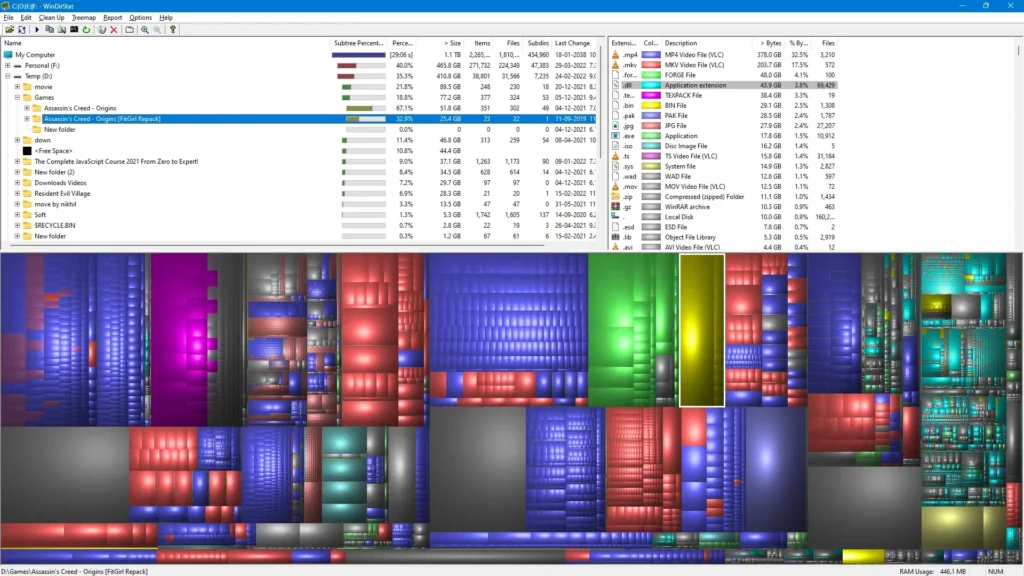
Each rectangle on the treemap corresponds to one file, and its surface area scales with the file's footprint. Directories form larger bounding rectangles that enclose their children, so parent areas reflect total subtree consumption. Hue encodes file type according to the legend panel, while subtle shading distinguishes nested folder boundaries.
Common questions
- What does WinDirStat do?
- WinDirStat scans your Windows drives and produces an interactive map of every folder and file, making it easy to spot what consumes the most storage.
- Is the source code available?
- Absolutely. WinDirStat is licensed under GPLv2, which means you are free to use, study, modify, and share it under the same terms.
- Can WinDirStat remove files on its own?
- No—the initial scan is strictly read-only. Deletion or cleanup occurs solely when you manually trigger an action inside the program.
- How do I get WinDirStat running?
- Grab an MSI or portable ZIP from the download area, or deploy via package managers such as winget (WinDirStat.WinDirStat) or Scoop (extras/windirstat).